01
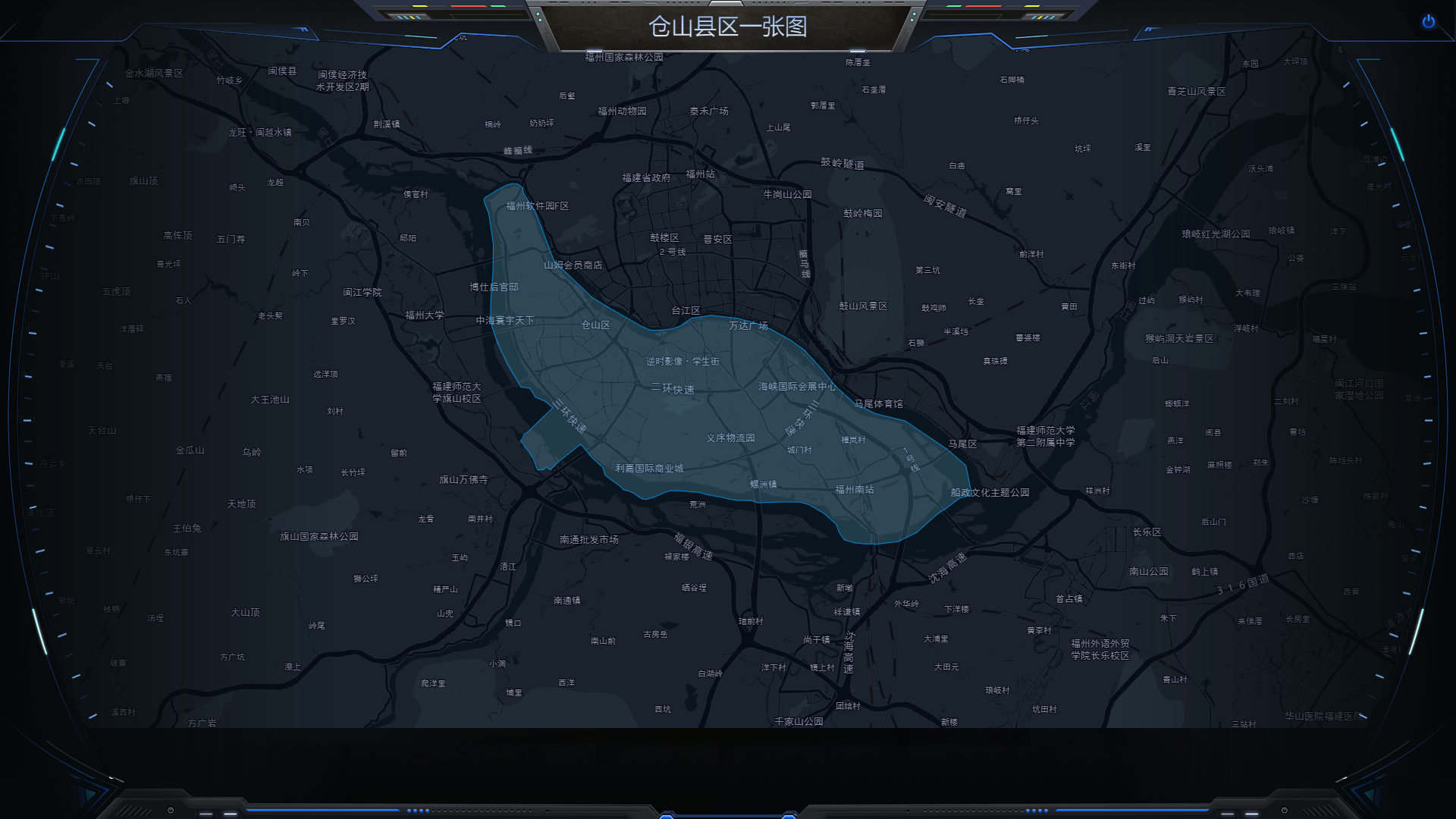
EFFECT DRAWWING
效果图
02
LANGUAGES
代码语言
vue+echartjs+Bmap
尺寸:1920px*1080px
压缩包不包含no_modules依赖文件,需根目录CMD 执行:
依赖命令如下:
npm i
运行命令如下:
npm run serve
打包命令如下:
npm run build
如果已有项目中使用,可根据根目录/README.md文件安装所需地图依赖
03
CONSTRUCTION
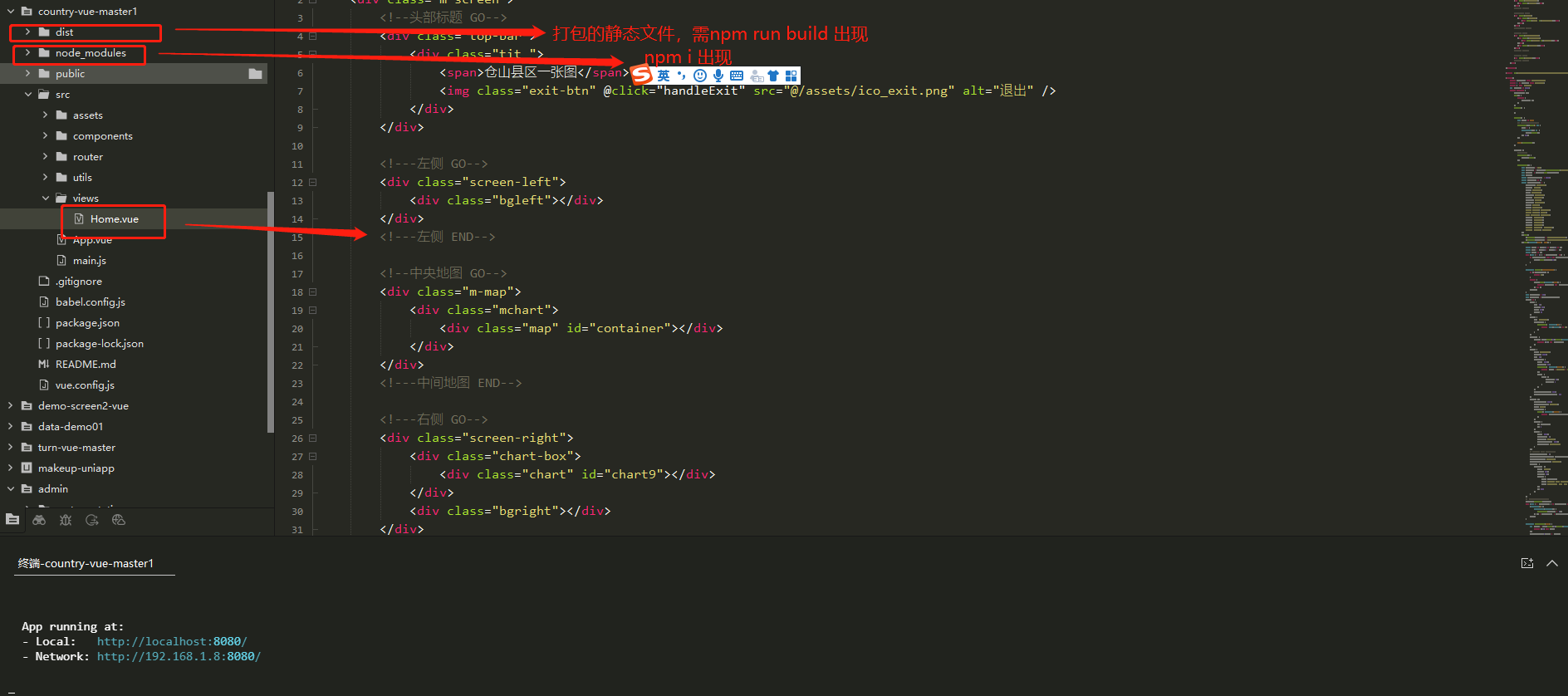
文件目录结构
04
Cascading Style Sheet
CSS部分
<style scoped>
	body {
		overflow: hidden !important;
	}

	.m-screen {
		width: 100%;
		height: 100vh;
		background: url("~@/assets/index_bg.jpg") 0 0 no-repeat;
		background-size: 100% 100%;
		overflow: hidden;
		position: relative;
	}

	.footer {
		width: 100%;
		height: 29px;
		background: url("~@/assets/footer_bg.gif") center 0 no-repeat;
		position: absolute;
		bottom: 0px;
		left: 0px;
		z-index: 9;
	}

	.top-bar {
		position: absolute;
		z-index: 12;
		top: 0px;
		left: 0px;
		height: 70px;
		width: 100%;
	}

	.top-bar .tit {
		color: #ffffff;
		text-align: center;
		font-size: 30px;
		height: 70px;
		position: relative;
		background: url('~@/assets/topbar_bg.gif') center 0px no-repeat;
	}

	.top-bar .exit-btn {
		cursor: pointer;
		position: absolute;
		top: 50%;
		right: 24px;
		margin-top: -20px;
	}

	.top-bar span {
		color: #ffffff;
		text-align: center;
		font-size: 30px;
		line-height: 70px;
		background-image: linear-gradient(360deg, #e0e9f3, #94bdfe);
		background-clip: text;
		-webkit-background-clip: text;
		color: transparent;
	}

	.screen-left {
		float: left;
		width: 550px;
		height: 100vh;
		padding-top: 70px;
		position: relative;
		z-index: 9;
		background: url('~@/assets/black_left.png') left 30px no-repeat;
		background-size: 439px calc(100vh - 30px);

	}

	.screen-left .bgleft {
		width: 167px;
		height: 1027px;
		position: absolute;
		left: 0px;
		top: 0px;
		background: url('~@/assets/left_bg.gif') left 30px no-repeat;
		background-size: 167px calc(100vh - 30px);
	}

	.m-map {
		width: 1920px;
		height: 100vh;
		position: fixed;
		top: 0px;
		left: 0px;
		overflow: hidden;
	}


	.m-map .map {
		width: 1920px;
		height: 960px;
		opacity: 1;


	}

	.screen-right {
		overflow: hidden;
		float: right;
		width: 550px;
		height: 100vh;
		position: relative;
		z-index: 9;
		padding-top: 70px;
		background: url('~@/assets/black_right.png') right 30px no-repeat;
		background-size: 439px calc(100vh - 30px);

	}

	.screen-right .chart {
		width: 100%;
		height: 600px;
	}

	.screen-right .bgright {
		width: 167px;
		height: 1027px;
		position: absolute;
		right: 0px;
		top: 0px;
		background: url('~@/assets/right_bg.gif') right 30px no-repeat;
		background-size: 167px calc(100vh - 30px);
	}
</style>
05
JAVASCRIPT
JS部分
JS修改省市区县名称即可显示范围:
	/*
			 *中央地图图表边界
			 */
			getMap(e) {
				let that = this;
				var map = new AMap.Map("container", {
					resizeEnable: true,
					mapStyle: "amap://styles/grey", //地图背景样式
					center: [119.30285, 26.073873], //地图中心点
					zoom: 20
				});
				//加载行政区划插件
				if (!district) {
					//实例化DistrictSearch
					var opts = {
						subdistrict: 0, //获取边界不需要返回下级行政区
						extensions: 'all', //返回行政区边界坐标组等具体信息
						level: 'district' //查询行政级别为 市
					};
					district = new AMap.DistrictSearch(opts);
				}
				//行政区查询
				district.setLevel('district');
				district.search('仓山区', function(status, result) {
					map.remove(that.polygons) //清除上次结果
					let polygons = [];
					var bounds = result.districtList[0].boundaries;
					if (bounds) {
						for (var i = 0; i < bounds.length; i++) {
							//生成行政区划polygon
							var polygon = new AMap.Polygon({
								strokeWeight: 1,
								path: bounds[i],
								fillOpacity: 0.2,
								fillColor: '#80d8ff',
								strokeColor: '#0091ea'
							});
							polygons.push(polygon);
						}
					}
					map.add(polygons)
					map.setFitView(polygons); //视口自适应
					map.setZoom(12);
				});
			}
登录情况对已下载过的代码包可以重复下载。如果未登录支付下载,想二次下载,可通过右侧公众号联系客服,绑定登录账号下载。
©软件著作权归平台所有。本站所有软件均来源于本平台开发团队手写代码,供学习使用!
代码使用的结构为开源的VUE+开源的echartJS。
转载请注明出处: codding » 大数据可视化前端模板002