01
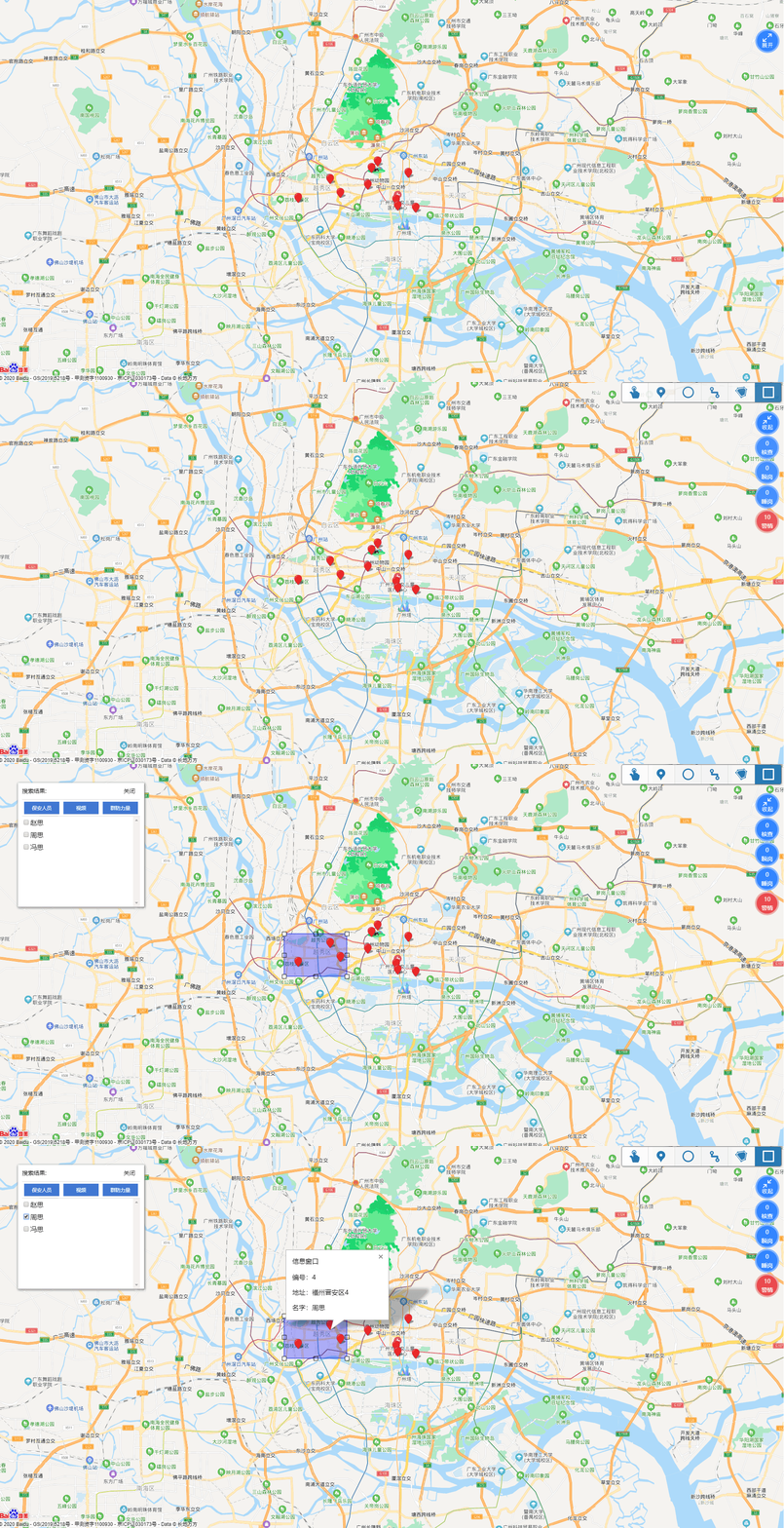
EFFECT DRAWWING
效果图
02
LANGUAGES
代码语言
1、申请百度地图秘钥;
2、修改index.html中js的地图key;
3、引入百度地图的画图js,详细见压缩包;
4、该demo核心为框选地图标注返回选中的标注信息,按业务扩充修改,代码备注详细。
03
CONSTRUCTION
文件目录结构

04
DOCUMENTS
HTML
<div id="allmap" style="overflow: hidden; position: relative; zoom: 1;">
	<div id="map" style="-webkit-transition: all 0.5s ease-in-out; height: 100%; transition: all 0.5s ease-in-out;">
	</div>

</div>
<!-- <input type="button" value="清除所有覆盖物" onclick="clearAll()" /> -->
<!--<input type="button" value="获取区域选择的标注点集合" onclick="getOverlayPath()"/> |||有效可点击获取||||-->

<div class="open" id="open"></div>
<div class="btnbox " id="o1">
	<div class="out">
		<span>0</span>
		<span>核查</span>
	</div>
</div>
<div class="btnbox " id="o2">
	<div class="out ">
		<span>0</span>
		<span>脱岗</span>
	</div>
</div>
<div class="btnbox " id="o3">
	<div class="out ">
		<span>0</span>
		<span>睡岗</span>
	</div>
</div>
<div class="btnbox have " id="o4">
	<div class="out ">
		<span>10</span>
		<span>警情</span>
	</div>
</div>

<div class="cont" id="J-cont" style="display:  none">

	<span>搜索结果: <p onclick="exit()" drawingtype="hander">关闭</p></span>
	<div class="items">

		<div class="item tabc_0" onclick="changeTab('0')"><span>保安人员</span>
			<p>群发</p>
		</div>
		<div class="item tabc_1" onclick="changeTab('1')"><span>视频</span></div>
		<div class="item tabc_2" onclick="changeTab('2')"><span>群防力量</span></div>
	</div>
	<div class="conin ltab_0" style="display: block;" id="J-items">
	</div>
	<div class=" ltab_1" id="J-items">
	</div>
	<div class="ltab_2" id="J-items">
	</div>
</div>
04
Cascading Style Sheets
CSS
  body,
  html,
  #allmap {
    font-family: "微软雅黑";
    height: 100%;
    margin: 0;
    overflow: hidden;
    width: 100%;
  }

  .cont {
    position: absolute;
    top: 50px;
    left: 50px;
    width: 288px;
    padding: 0 10px;
    background: #ffffff;
    overflow: hidden;
    line-height: 40px;
    box-shadow: 0px 2px 5px #D9D9D9, 1px 2px 5px #333333;
  }

  .cont span {
    width: 100%;
    display: block;
    position: relative;
    border-bottom: 1px solid #d6d7dc;
    font-size: 14px;
  }

  .cont span p {
    width: 40px;
    height: 30px;
    display: block;
    margin: 0px;
    position: absolute;
    top: 0px;
    right: 0px;
    cursor: pointer;
  }

  .ltab_0,
  .ltab_1,
  .ltab_2 {
    line-height: 30px;
    height: 200px;
    overflow-x: hidden;
    overflow-y: scroll;
    padding-bottom: 20px;
  }

  .items {
    width: 100%;
    overflow: hidden;
    border-bottom: 1px solid #d6d7dc;
  }

  .item {
    width: 86px;
    float: left;
    height: 30px;
    line-height: 30px;
    margin: 5px;
    text-align: center;
    color: #ffffff;
    float: left;
  }

  .item span {
    width: 86px;
    float: left;
    height: 30px;
    line-height: 30px;
    text-align: center;
    cursor: pointer;
    background: #3c7cd5;
    color: #ffffff;
    font-size: 12px;
  }

  .item p {
    width: 50px;
    float: right;
    margin: 3px 0;
    height: 25px;
    border-radius: 5px;
    font-size: 13px;
    line-height: 25px;
    text-align: center;
    cursor: pointer;
    color: #3c7cd5;
    border: 1px solid #d6d7dc;
  }

  .ltab_0 {
    display: none;
  }

  .ltab_1 {
    display: none;
  }

  .ltab_2 {
    display: none;
  }

  .hide {
    display: none !important
  }

  .show {
    display: block !important;
  }

  /*右侧按钮组*/
  .btnbox {
    width: 60px;
    height: 60px;
    background: url(../btn-item.png) 0 0 no-repeat;
    position: absolute;
    top: 75px;
    right: 10px;
    z-index: 999;
    overflow: hidden;
    margin-bottom: 17px;
    cursor: pointer;
    transition: all .3s ease-in-out .1s;
    -webkit-transition: all .3s ease-in-out .1s;
    -moz-transition: all .3s ease-in-out .1s;
    -o-transition: all .3s ease-in-out .1s;

  }

  .btnbox .out {
    width: 60px;
    height: 60px;
  }

  .btnbox span {
    width: 60px;
    display: inline-block;
    height: 17px;
    line-height: 17px;
    font-size: 14px;
    margin: 0px;
    text-align: center;
    color: #ffffff;
  }

  .btnbox span:first-child {
    margin-top: 10px;
  }

  .btnbox:hover .out {
    background: url(../btn-item-hover.gif) 0 0 no-repeat;
  }

  .btnbox.have {
    background: url(../btn-item-hover.png) 0 0 no-repeat;
  }

  .open {
    width: 59px;
    height: 59px;
    position: absolute;
    top: 75px;
    right: 10px;
    z-index: 9999;
    cursor: pointer;
    background: url(../btn-open.png) 0 0 no-repeat;
  }

  .o1 {
    top: 135px;
    right: 10px;
  }

  .o2 {
    top: 195px;
    right: 10px;
  }

  .o3 {
    top: 255px;
    right: 10px;
  }

  .o4 {
    top: 315px;
    right: 10px;
  }

  .BMapLib_Drawing {
    transition: all .5s ease-in-out .1s;
    -webkit-transition: all .5s ease-in-out .1s;
    -moz-transition: all .5s ease-in-out .1s;
    -o-transition: all .5s ease-in-out .1s;

  }
05
OTHER TIPS
其他说明
其他说明可以查看压缩包。
登录情况对已下载过的代码包可以重复下载。如果未登录支付下载,想二次下载,可通过右侧公众号联系客服,绑定登录账号下载。
©软件著作权归平台所有。本站所有软件均来源于本平台开发团队手写代码,供学习使用!
代码使用的结构为开源的VUE+开源的echartJS。
转载请注明出处: codding » 百度地图框选标注坐标返回标注信息